Showing posts with label SP1. Show all posts

Friday, January 25, 2013

How to Install/update DPM 2012 protection agent SP1 RU1 manually

Hi Guys,

When you install/update your DPM 2012 protection agent from pre SP1 or SP1 to SP1 RU1 through DPM console it's fairly easy. You just have to click on Update available in Management/Agent tab and the job is done. 

Sometimes (Firewall, incompatible version, etc.) DPM agent cannot be updated from DPM console and you need to proceed manually.
When you try to do manual install/update, it's a little bit more tricky :) Because there are two DPM "agent" folders in DPM directory structure:
..\DPM\ProtectionAgents\RA\4.1.3313.0\... => Which contains agent SP1 RTM
..\DPM\agents\RA\4.1.3322.0\... => Which contains agent upgrade for SP1 RU1
To manually install/Update DPM agent to DPM 2012 SP1 RU1 you have to:
  1. Uninstall old agent from control panel
  2. Manually install agent SP1 RTM - 4.1.3313.0
  3. Manually apply upgrade SP1 RU1 - 4.1.3322.0
# Install/upgrade process could be done with a sample Dos script:

Net use U: \\DPMName\c$
Cd /d "U:\Program Files\Microsoft System Center 2012\DPM\DPM\ProtectionAgents\RA\4.1.3313.0\amd64"
DPMAgentInstaller_x64 /q /IAcceptEULA
:: Let enough time for install
ping 127.0.0.1 -n 240
Cd /d "U:\Program Files\Microsoft System Center 2012\DPM\DPM\agents\RA\4.1.3322.0\amd64\1033"
DPMAgentInstaller_KB2791508_AMD64 /q
:: Let enough time for install
ping 127.0.0.1 -n 240

:: in case of new installation, just remember to attach your new protected server to your DPM Server.
cd /d "C:\Program Files\Microsoft Data Protection Manager\DPM\bin"
setdpmserver.exe -dpmservername DPMName
Net use U: /delete


Stephane

Friday, January 11, 2013

Available: Update Rollup 1 for System Center 2012 Service Pack 1

Issue that are fixed in this Update Rollup 1 for DPM 2012 SP1:

Client backups fail when there is a case difference between the client computer name on the computer and the client computer name that is stored in Active Directory.

## Installation instructions - To install the update for Data Protection Manager, follow these steps:
  1. Before you install this update, make a backup of the DPM database.
  2. Install the rollup package on the server that is running System Center 2012 SP1 - Data Protection Manager. To do this, run Microsoft Update on the server.
  3. In the DPM Administrator Console, update the protection agents.
Caution: You may have to restart your DPM server after you install this rollup package.

Description of Update Rollup 1 for System Center 2012 Service Pack 1
Download Update Rollup 1 for System Center 2012 Service Pack 1

Upgrade DPM 2012 RTM or QFEx to SP1 RTM

Hi Guys,

I made a few tests in sandbox to upgrade various version of DPM 2012 + QFEx hosting on W2008R2 before to go to production.

First thing is that your DPM 2012 server must have QFE3 KB2751230 installed. If you try to upgrade from DPM 2012 RTM or DPM 2012 QFE2, it won't work...


If QFE3 is already installed, then you can go to upgrade to SP1 RTM.

But the most important thing is that after the DPM upgrade operation, you will have to upgrade your protection agent on protected computer ASAP because no backup and recovery task could be made until agent's upgrade is done...

So take your time and plan rigorously (Mainly on large DPM environment) your DPM 2012 SP1 upgrade to avoid too long production's outage.


Remember Backup your DPM DB before doing the upgrade

# Launch DPM 2012 SP1 Volume ISO/DVD, notice that "Service pack 1" is indicated on the Left bottom corner. Choose Install / Data Protection Manager.


# Accept the License terms, click Next on Welcome page.
# Prerequisites Check: For this upgrade, I use the decicated instance of SQL server, Click on Check and Install, then Next.


# Review and click Next on Product registration, Installation settings, Security settings, Microsoft Update Opt-In and Customer feedback option.
# Installation is finished : Data Protection Manager has been successfully upgraded. Click Close to close the DPM wizard.


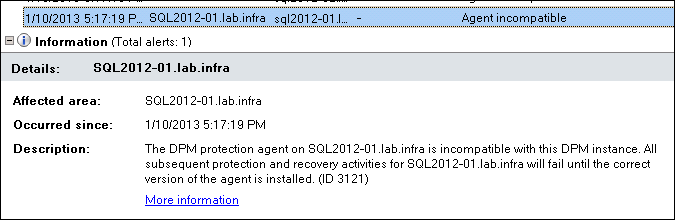
# After the Upgrade you must update ASAP DPM protection Agent on protected computer...


because old agent are incompatible with the new DPM instance. No backup and No Recovery could be made until the update...


# Upgrade protection agent by clicking on Update Available. Notice that you may need to make a consistency check after the upgrade is complete.


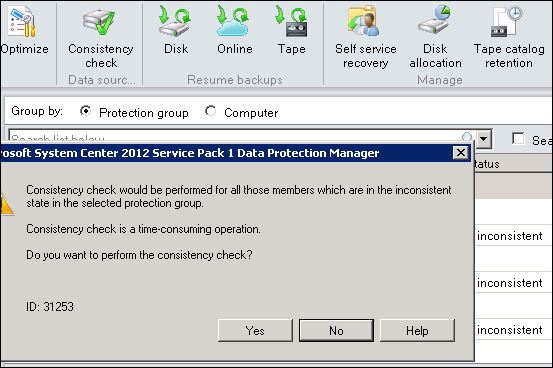
# When Agent upgrade is done, select your Protection Group where replicas is inconsistent and then perform a Concistency Check.


Remember that Concistency Check could be time-consuming, click Yes.


# Verify that all your Protection Group are in green state.


# Congratulation :) DPM 2012 SP1 Upgrade is done.


Tuesday, December 18, 2012

SC 2012 SP1 RTM in early january

A good new from Mike Jacquet :

Meanwhile don't install SP1 beta, because there is no upgrade way from Beta SP1 to RTM SP1...

General Availability is targeted for early January. 
  • Upgrade from Sp1 Beta is only supported for TAP customers who installed RC.
  • Non-TAP customers will only be able to upgrade from DPM 2012 RTM (+ qfe's) to DPM 2012 SP1 RTM.
  •  There is no upgrade path from BETA Sp1 to RTM Sp1, you must reinstall DPM 2012 RTM, then upgrade to SP1 RTM.
Technet content will be updated to include new supported workloads in SP1 of Exchange 2013 and Sharepoint 2013.

Tuesday, October 2, 2012

Donwload System Center 2012 Service Pack 1 Beta

My First post :)

Updates to System Center 2012 for compatibility with Windows 8, Windows Server 2012 and other enhancements including support for Azure VM and capabilities for Hosted Service Providers.

Link here SP1.

The Beta includes updates and enhancements to the following DPM 2012 components: 
  • Improved backup performance of Hyper-V over CSV 2.0
  • Protection for Hyper-V over remote SMB share
  • Protection for Windows Server 2012 de-duplicated volumes
  • Uninterrupted protection for VM live migration