Showing posts with label DPM2012. Show all posts

Friday, January 25, 2013

How to Install/update DPM 2012 protection agent SP1 RU1 manually

Hi Guys,

When you install/update your DPM 2012 protection agent from pre SP1 or SP1 to SP1 RU1 through DPM console it's fairly easy. You just have to click on Update available in Management/Agent tab and the job is done. 

Sometimes (Firewall, incompatible version, etc.) DPM agent cannot be updated from DPM console and you need to proceed manually.
When you try to do manual install/update, it's a little bit more tricky :) Because there are two DPM "agent" folders in DPM directory structure:
..\DPM\ProtectionAgents\RA\4.1.3313.0\... => Which contains agent SP1 RTM
..\DPM\agents\RA\4.1.3322.0\... => Which contains agent upgrade for SP1 RU1
To manually install/Update DPM agent to DPM 2012 SP1 RU1 you have to:
  1. Uninstall old agent from control panel
  2. Manually install agent SP1 RTM - 4.1.3313.0
  3. Manually apply upgrade SP1 RU1 - 4.1.3322.0
# Install/upgrade process could be done with a sample Dos script:

Net use U: \\DPMName\c$
Cd /d "U:\Program Files\Microsoft System Center 2012\DPM\DPM\ProtectionAgents\RA\4.1.3313.0\amd64"
DPMAgentInstaller_x64 /q /IAcceptEULA
:: Let enough time for install
ping 127.0.0.1 -n 240
Cd /d "U:\Program Files\Microsoft System Center 2012\DPM\DPM\agents\RA\4.1.3322.0\amd64\1033"
DPMAgentInstaller_KB2791508_AMD64 /q
:: Let enough time for install
ping 127.0.0.1 -n 240

:: in case of new installation, just remember to attach your new protected server to your DPM Server.
cd /d "C:\Program Files\Microsoft Data Protection Manager\DPM\bin"
setdpmserver.exe -dpmservername DPMName
Net use U: /delete


Stephane

Tuesday, January 22, 2013

DPM 2012: install a protection agent manually - how to automatically approve Microsoft Software License Terms

Hi guys,

During the past few days, I struggled with the silently manual install of DPM 2012 agent. Whatever the command I used, a popup screen appeared and I needed to validate Microsoft Sofware Licenses Terms... Very annoying :)

I tried various combinations like: /quiet, /q, /quiet /AcceptEula:yes...


An user from DPM forum pointed me to the right direction: /IAcceptEula 

So log on to the protected computers, navigate to the network share, and then run the appropriate DPMAgentInstaller.exe command: 
DpmAgentInstaller.exe [/q] [DPM server name] [/IAcceptEula]

This parameter is referenced in Technet link : Post-upgrade steps

Stephane.

Friday, January 11, 2013

Available: Update Rollup 1 for System Center 2012 Service Pack 1

Issue that are fixed in this Update Rollup 1 for DPM 2012 SP1:

Client backups fail when there is a case difference between the client computer name on the computer and the client computer name that is stored in Active Directory.

## Installation instructions - To install the update for Data Protection Manager, follow these steps:
  1. Before you install this update, make a backup of the DPM database.
  2. Install the rollup package on the server that is running System Center 2012 SP1 - Data Protection Manager. To do this, run Microsoft Update on the server.
  3. In the DPM Administrator Console, update the protection agents.
Caution: You may have to restart your DPM server after you install this rollup package.

Description of Update Rollup 1 for System Center 2012 Service Pack 1
Download Update Rollup 1 for System Center 2012 Service Pack 1

Upgrade DPM 2012 RTM or QFEx to SP1 RTM

Hi Guys,

I made a few tests in sandbox to upgrade various version of DPM 2012 + QFEx hosting on W2008R2 before to go to production.

First thing is that your DPM 2012 server must have QFE3 KB2751230 installed. If you try to upgrade from DPM 2012 RTM or DPM 2012 QFE2, it won't work...


If QFE3 is already installed, then you can go to upgrade to SP1 RTM.

But the most important thing is that after the DPM upgrade operation, you will have to upgrade your protection agent on protected computer ASAP because no backup and recovery task could be made until agent's upgrade is done...

So take your time and plan rigorously (Mainly on large DPM environment) your DPM 2012 SP1 upgrade to avoid too long production's outage.


Remember Backup your DPM DB before doing the upgrade

# Launch DPM 2012 SP1 Volume ISO/DVD, notice that "Service pack 1" is indicated on the Left bottom corner. Choose Install / Data Protection Manager.


# Accept the License terms, click Next on Welcome page.
# Prerequisites Check: For this upgrade, I use the decicated instance of SQL server, Click on Check and Install, then Next.


# Review and click Next on Product registration, Installation settings, Security settings, Microsoft Update Opt-In and Customer feedback option.
# Installation is finished : Data Protection Manager has been successfully upgraded. Click Close to close the DPM wizard.


# After the Upgrade you must update ASAP DPM protection Agent on protected computer...


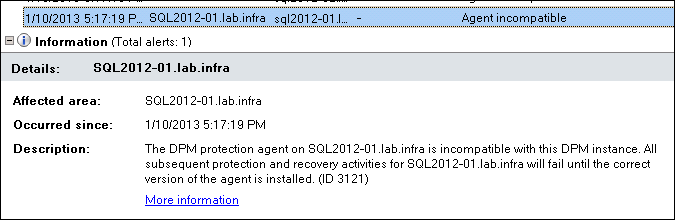
because old agent are incompatible with the new DPM instance. No backup and No Recovery could be made until the update...


# Upgrade protection agent by clicking on Update Available. Notice that you may need to make a consistency check after the upgrade is complete.


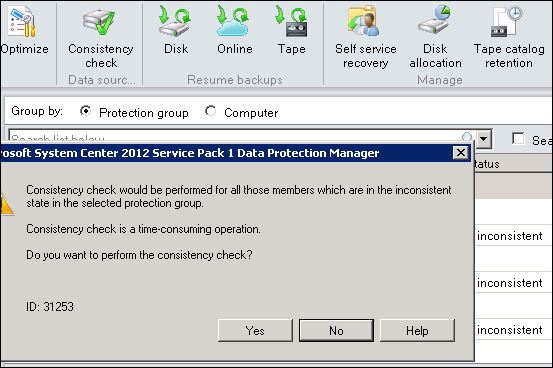
# When Agent upgrade is done, select your Protection Group where replicas is inconsistent and then perform a Concistency Check.


Remember that Concistency Check could be time-consuming, click Yes.


# Verify that all your Protection Group are in green state.


# Congratulation :) DPM 2012 SP1 Upgrade is done.


Tuesday, December 18, 2012

SC 2012 SP1 RTM in early january

A good new from Mike Jacquet :

Meanwhile don't install SP1 beta, because there is no upgrade way from Beta SP1 to RTM SP1...

General Availability is targeted for early January. 
  • Upgrade from Sp1 Beta is only supported for TAP customers who installed RC.
  • Non-TAP customers will only be able to upgrade from DPM 2012 RTM (+ qfe's) to DPM 2012 SP1 RTM.
  •  There is no upgrade path from BETA Sp1 to RTM Sp1, you must reinstall DPM 2012 RTM, then upgrade to SP1 RTM.
Technet content will be updated to include new supported workloads in SP1 of Exchange 2013 and Sharepoint 2013.

Tuesday, December 4, 2012

Powershell : How to delete Protection Group

Hi Guys,

I use these Powershell scripts to remove datasources from Protection Group:

(Data are retained for recovery purpose when using "-KeepDiskData" parameter. If you don't use "-KeepDiskData", Replica and Recovery points will be deleted)

1- CleanUp your DPM Server - Delete All Protection Groups

Connect-DpmServer $env:COMPUTERNAME
$PgList = @()
$PgList = Get-ProtectionGroup -DPMServerName $env:computername
foreach($Pg in $PgList){
write-host ""
Write-host "# ProtectionGroup Name " -ForegroundColor red -Nonewline
Write-host $Pg.FriendlyName -ForegroundColor green
$mpg = Get-ModifiableProtectionGroup $Pg
$dsList = @()
$dsList = Get-DataSource -ProtectionGroup $Pg
foreach($ds in $dsList){
write-host ("Remove data source ",$ds.Name)
Remove-ChildDataSource -ProtectionGroup $mpg -ChildDataSource $ds -keepDiskData
}
Set-ProtectionGroup $mpg
}
Disconnect-DpmServer $env:COMPUTERNAME


2- Delete a Protection Goup 

Connect-DpmServer $env:COMPUTERNAME
$StringSearch="YourStringSearch"
$PgList = @()
$pgList = Get-ProtectionGroup -DPMServerName $env:computername
where {($_.friendlyname) -match $StringSearch}
foreach($Pg in $PgList){
write-host ""
Write-host "# ProtectionGroup Name " -ForegroundColor red -Nonewline
Write-host $Pg.FriendlyName -ForegroundColor green
$mpg = Get-ModifiableProtectionGroup $Pg
$dsList = @()
$dsList = Get-DataSource -ProtectionGroup $Pg
foreach($ds in $dsList){
write-host ("Remove data source ",$ds.Name)
Remove-ChildDataSource -ProtectionGroup $mpg -ChildDataSource $ds -keepDiskData
}
Set-ProtectionGroup $mpg
}
Disconnect-DpmServer $env:COMPUTERNAME


Feel free to customize/use it.

Monday, November 26, 2012

When you trying to protect W8 clients, you get an error ID:30156, ID:31207 or ID:31209

When you try to protect W8 clients with DPM 2010 or DPM 2012 (RU3), you get some error messages :

DPM is unable to continue protection for because the change tracking information is corrupt (ID 30156 Details: The system cannot find the file specified (0x80070002))

Cannot perform creation of a recovery point on a replica which is pending manual replica creation (ID: 31207)

Cannot perform creation of a recovery point on a replica which is inconsistent (ID: 31209)


# DPM 2012 workaround
On the protected W8 clients :
  1. Located the dpmfilter.inf file and right-click and choose install.
  2. Open an administrative command prompt and run: fltmc load dpmfilter
(dpmfilter.inf => C:\Program Files\Microsoft Data Protection Manager\DPM\bin)

# DPM 2010 workaround
On the protected W8 clients :

  1. browse to the registry path : HKEY_LOCAL_MACHINE\SOFTWARE\Microsoft\Microsoft Data Protection Manager\Agent\2.0.
  2. Create a DWORD registry value named ForceFixup and set it to1.
Or
  1. Located the dpmfilter.inf file and right-click and choose install.
  2. Open an administrative command prompt and run: fltmc load dpmfilter
As soon as you apply a workaround, you may have to perform a consistency check and your W8 protections will be fine.

Sunday, November 4, 2012

DPM 2012 RU3 - DPMDB database and log file could get very big when running SharePoint Catalog Task

Hi all,

DPM 2012 RU3 has introduced a spelling mistake in SQL Store Procedure leading to dysfonction of Sharepoint Catalog task: http://social.technet.microsoft.com/Forums/en-ZA/dataprotectionmanager/thread/e0e70be6-7249-438d-b43c-a0456f7c1338

The store procedure prc_PRM_SharePointRecoverableObject_Update should be modified. 

Open Microsoft SQL Manager Studio :

Go to DPMDB / Programmability / Stored Procedures

### before ###
USE [DPMDB]
GO
/****** Object: StoredProcedure [dbo].[prc_PRM_SharePointRecoverableObject_Update] Script Date: 11/04/2012 09:53:37 ******/
SET ANSI_NULLS ON
GO
SET QUOTED_IDENTIFIER ON
GO
ALTER PROCEDURE [dbo].[prc_PRM_SharePointRecoverableObject_Update]
(
@Caption nvarchar(40),
@ComponentType nvarchar(16),
@RecoverableObjectId BIGINT
)
AS
DECLARE @error INT,
@rowCount INT
SET @error = 0

SET NOCOUNT ON
UPDATE tbl_RM_SharePointRecoverableObject SET Caption = @Caption
UPDATE tbl_RM_SharePointRecoverableObject SET Caption = @Caption,
ComponentType = @ComponentType
WHERE RecoverableObjectId = @RecoverableObjectId

SELECT @error = dbo.udf_DPS_CheckRowCount(1)
SET NOCOUNT OFF
RETURN @error


### After ###
USE [DPMDB]
GO
/****** Object: StoredProcedure [dbo].[prc_PRM_SharePointRecoverableObject_Update] Script Date: 11/04/2012 09:53:37 ******/
SET ANSI_NULLS ON
GO
SET QUOTED_IDENTIFIER ON
GO
ALTER PROCEDURE [dbo].[prc_PRM_SharePointRecoverableObject_Update]
(
@Caption nvarchar(40),
@ComponentType nvarchar(16),
@RecoverableObjectId BIGINT
)
AS
DECLARE @error INT,
@rowCount INT
SET @error = 0

SET NOCOUNT ON
-- UPDATE tbl_RM_SharePointRecoverableObject SET Caption = @Caption
UPDATE tbl_RM_SharePointRecoverableObject SET Caption = @Caption,
ComponentType = @ComponentType
WHERE RecoverableObjectId = @RecoverableObjectId

SELECT @error = dbo.udf_DPS_CheckRowCount(1)
SET NOCOUNT OFF
RETURN @error


This bug will most likely fixed in the SP1.

Wednesday, October 10, 2012

Available: Update Rollup 3 for System Center 2012

List of issues that are fixed in Update Rollup 3 for System Center 2012 - Mostly for SharePoint, feel free to apply or wait for SP1 - :

Update Rollup 3 for System Center Data Protection Manager 2012 (KB2751230)

UR3 have been released via Microsoft Update.
For more information and to download: http://support.microsoft.com/kb/2756127/en-us

Issue 1
After you upgrade System Center Data Protection Manager 2010 to System Center Data Protection Manager 2012, the tape management report does not display overdue tapes.

Issue 2
System Center Data Protection Manager 2012 Client Protection does not scale to the limits that are expected.

Issue 3
When you try to specify a client computer name in the DPMServerName attribute by using Windows PowerShell, Windows PowerShell crashes.

Issue 4
When the name of a Microsoft SharePoint site collection contains a space, and you perform a SharePoint item-level recovery operation in System Center Data Protection Manager 2012, the operation fails.

Issue 5
After you rename a SharePoint site in System Center Data Protection Manager 2012, you cannot restore the site.

Issue 6
The SharePoint Recovery Point Status Report displays incorrect data in System Center Data Protection Manager 2012.

Issue 7
A bare metal recovery fails in certain situations.

Tuesday, October 9, 2012

HowTo : Configure DPM to use an SMTP server that does not require authentication

To use a SMTP server that does not require authentication to send DPM notifications you have to follow these steps: (works on DPM2010 & DPM 2012)

First you should verify that your DPM server is allowed to relay on your SMTP server.

If you are using Microsoft IIS, you will find this security settings in IIS MMC  by right-clicking SMTP virtual Server then Properties. Select Access tab / Relay restriction  / Relay. Check box Only the list below , then click Add and provide IP, Subnet or Domain Name.

In the DPM Administrator Console go to the Monitoring tab / Options / SMTP Server and fill in SMTP settings according to your environment:
  • SMTP server name: YourSMTPServer
  • SMTP Server Port: 25
  • From Address: Address of the sender

Important: You must also fill in Authenticated SMTP server fields.

Why ? Because DPM requires ALL the fields under the SMTP Server options to be filled in regardless if your SMTP server accepts anonymous connections or not.  if your SMTP server does not require authentication the credentials are useless, it's just that GUI is expecting all fields to be filled in.

The GUI could have been more precise or at least a mouse over option might help. Technet article is also a little bit unclear... http://technet.microsoft.com/en-us/library/hh758196.aspx :)


If you click on Send Test E-mail without filling in Username or Password, you will receive the following error: ID: 2013 Details: Logon Failure: unknown user name or bad password.

If you fill in a Username and Password of a local DPM account (No administrative rights) and try to send a Test E-mail again :


DPM will ask you to provide the e-mail address to sent the test message: 


Then after clicking on Send button.

You will receive a new message: An E-mail message has been successfully sent to ...


Good job, finally open your mailbox and verify that you receive the test message.

Tuesday, October 2, 2012

HowTo install .NET Framework 3.5 on Windows 2012

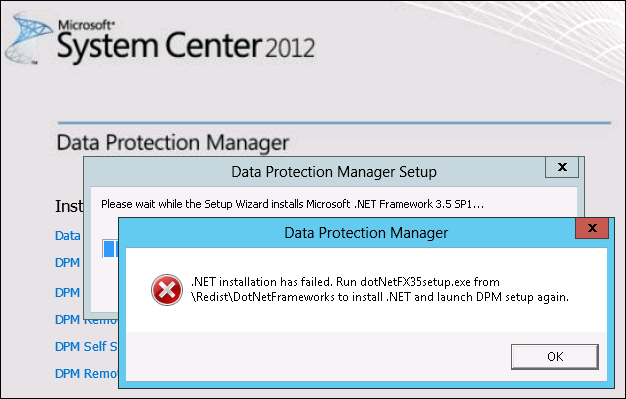
When you try to install DPM 2012 on Windows 2012 server, .NET Framework 3.5 is a prerequisite and could not be installed directly by DPM.


If you try to install .NET Framework 3.5 from your DPM 2012 ISO/DVD folder SCDPM\Redist\DotNetFrameworks\DotNetFx35setup, this does not work either:


If you have Windows 2012 iso/DVD, you can install .NET Framework 3.5 by following these steps:

1. Insert Windows Server 2012 DVD or iso to  drive.
2. Open Add Roles and Features Wizard
3. Select .NET Framework 3.5 Features and then click next,
4. Select Specify an alternate source path link in the Confirm installation selections screen.


5. Path: :\Sources\SxS and then click OK.


6. Finally click Install button.

If you don't Specify an alternate source path link, you will have this error message :
The request to add or remove feature on the specified server failed. Installation of one or more roles, roles services, or features failed. The parameter is incorrect. Error: 0x80070057


Now you can installed DPM 2012 on Windows 2012.

Donwload System Center 2012 Service Pack 1 Beta

My First post :)

Updates to System Center 2012 for compatibility with Windows 8, Windows Server 2012 and other enhancements including support for Azure VM and capabilities for Hosted Service Providers.

Link here SP1.

The Beta includes updates and enhancements to the following DPM 2012 components: 
  • Improved backup performance of Hyper-V over CSV 2.0
  • Protection for Hyper-V over remote SMB share
  • Protection for Windows Server 2012 de-duplicated volumes
  • Uninterrupted protection for VM live migration